[순서]
- 1) ELK 아키텍처 개괄
- 2) Fluentd 설치
- 3) Log Generator로 로그 생성
- 4) Opensearch 설치 <-- 여기까지
- 5) Fluentd로 로그파일 읽어서 보내기
- 6) Opensearch Dashboard로 시각화하기
[Prerequisite] - Fluentd, Opensearch 설치를 위한 조건 및 가정
- WSL2, Docker는 설치되어 있다고 가정 => Docker 설치는 공식문서 참조!! (공식문서가 제일 깔끔한 것 같습니다.)
- WSL은 amd 기반의 cpu를 기준으로 함(arm은 꼭 공식 문서 및 별도 자료 참조!!)
https://docs.docker.com/engine/install/ubuntu/
Install Docker Engine on Ubuntu
docs.docker.com
- ELK 스택에 대한 개념과 ELK가 아닌 Fluentd, Opensearch, Opensearch Dashboard로 실습하는 이유는 이전 포스트를 참고해주시면 감사하겠습니다!!
https://semizero.tistory.com/37
[ELK] 로그모니터링을 위한 ELK Stack 개념들!!
로컬에서 개인적인 개발을 진행할 경우에는 로그의 중요성을 체감하기 어렵다. 어차피 내가 진행한 작업환경이고 에러가 날 경우 시스템의 히스토리를 알기에 일일이 찾아서 수정하면 되기 때
semizero.tistory.com
1) ELK 아키텍처 개괄
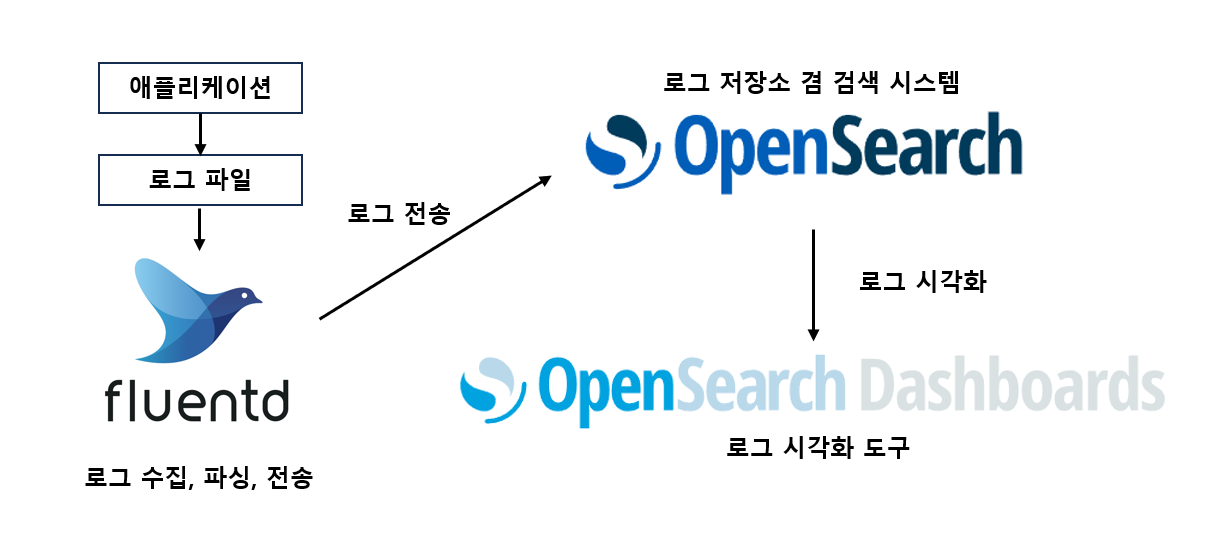
ELK가 아니라 OFO??
간단한 실습이기에 Log Generator에서 임의의 로그를 생성하고, Fluentd에서 수집한 로그를 바로 Opensearh로 전송하고, Opensearch Dashboards로 시각화하는 아키텍처로 실습을 진행하겠다.
2) Fluentd 설치하기
0. 공식 문서를 통한 설치(항상 공식 문서를 통해 설치하는 법을 우선으로 생각하자!!)
https://docs.fluentd.org/installation/before-install
Before Installation - Fluentd
Fluentd sometimes uses predictable paths for dumping, writing files, and so on. This default settings for the protections are in /etc/sysctl.d/10-link-restrictions.conf, or /usr/lib/sysctl.d/50-default.conf or elsewhere.
docs.fluentd.org
1. 서버에 직접 설치
- apt update 진행
sudo apt update
sudo apt install build-essential -y- Ruby Gem을 설치해주어야 한다!!
sudo apt install ruby-rubygems -y
sudo apt install ruby-dev -y
sudo gem install fluentd --no-doc- fluentd directory 세팅
fluentd --setup ./fluent
fluntd 설치 확인
3) Log Generator로 로그 생성
1. Log Generator 설치
- minikube의 바이너리를 다운 받고, 실행할 수 있도록 변경해줍니다.
mkdir loggen && cd loggen
wget https://github.com/mingrammer/flog/releases/download/v0.4.3/flog_0.4.3_linux_amd64.tar.gz
tar -xvf flog_0.4.3_linux_amd64.tar.gz
./flog --help
2. Log 생성
실습을 위해 json 파일 3개를 만들어 둡니다.
#./flog -f json -t log -s 1m -n 1000 -o $filename -w &
#$filename을 원하는 이름으로
./flog -f json -t log -s 1m -n 1000 -o json-1.log -w &
./flog -f json -t log -s 1m -n 1000 -o json-2.log -w &
./flog -f json -t log -s 1m -n 1000 -o json-3.log -w &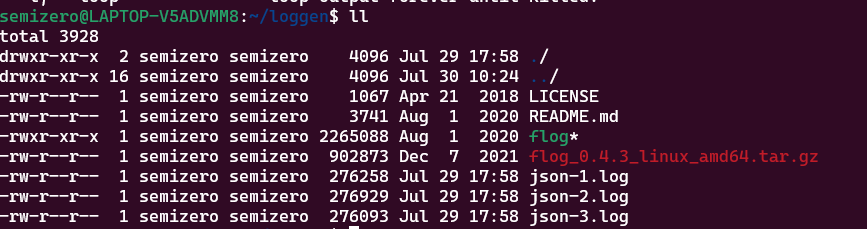
- json-1.log 예시

4) Opensearch 설치
0. 공식 문서를 통한 설치
https://opensearch.org/docs/latest/install-and-configure/install-opensearch/tar/
Tarball
Tarball
opensearch.org
사전 점검 사항
해결 방법
1. 전용 사용자 생성 및 권한 설정 (권장)
# 1. opensearch 사용자 생성
sudo useradd -m -s /bin/bash opensearch

# 2. OpenSearch 설치 디렉토리 권한 변경 (경로는 실제 설치 위치에 맞게 조정)
sudo chown -R opensearch:opensearch /path/to/opensearch

# 3. opensearch 사용자로 전환 후 실행
sudo su - opensearch
cd /path/to/opensearch
./bin/opensearch
2. 백그라운드 서비스로 실행 (systemd)
# /etc/systemd/system/opensearch.service 파일 생성
sudo tee /etc/systemd/system/opensearch.service << 'EOF'
[Unit]
Description=OpenSearch
Wants=network-online.target
After=network-online.target

[Service]
Type=simple
User=opensearch
Group=opensearch
WorkingDirectory=/usr/share/opensearch
Environment=OPENSEARCH_HOME=/usr/share/opensearch
Environment=OPENSEARCH_PATH_CONF=/etc/opensearch
ExecStart=/usr/share/opensearch/bin/opensearch
Restart=on-failure
LimitNOFILE=65535

[Install]
WantedBy=multi-user.target
EOF

# 서비스 활성화 및 시작
sudo systemctl daemon-reload
sudo systemctl enable opensearch
sudo systemctl start opensearch
3. Docker로 실행 시
# 공식 이미지 사용 (내부적으로 non-root 사용자로 실행)
docker run -d \
  --name opensearch \
  -p 9200:9200 \
  -p 9600:9600 \
  -e "discovery.type=single-node" \
  -e "OPENSEARCH_INITIAL_ADMIN_PASSWORD=your-strong-password" \
  opensearchproject/opensearch:2.18.0
4. 개발/테스트 환경에서만 (보안 권장하지 않음)
# 환경 변수 설정으로 root 실행 허용 (비권장)
export OPENSEARCH_JAVA_OPTS="-Des.insecure.allow.root=true"
./bin/opensearch-Des.insecure.allow.root=true권장 설정 요약
| 항목 | 설정 |
| 사용자 | opensearch (전용 사용자) |
| 그룹 | opensearch |
| 파일 디스크립터 한도 | 65535 이상 (ulimit -n 65535) |
| 가상 메모리 | vm.max_map_count=262144 |
# 가상 메모리 설정 (영구)
sudo sysctl -w vm.max_map_count=262144
echo "vm.max_map_count=262144" | sudo tee -a /etc/sysctl.conf
전용 사용자를 생성하여 실행하는 것이 가장 안전하고 권장되는 방법입니다.
1. Opensearch 설치
sudo apt update
sudo apt install build-essential -y
# x64
wget https://artifacts.opensearch.org/releases/bundle/opensearch/2.4.0/opensearch-2.4.0-linux-x64.tar.gz
# x64
tar -xvf opensearch-2.4.0-linux-x64.tar.gz
cd opensearch-2.4.0
export OPENSEARCH_HOME=$/etc/opensearch
#export OPENSEARCH_HOME=/etc/opensearch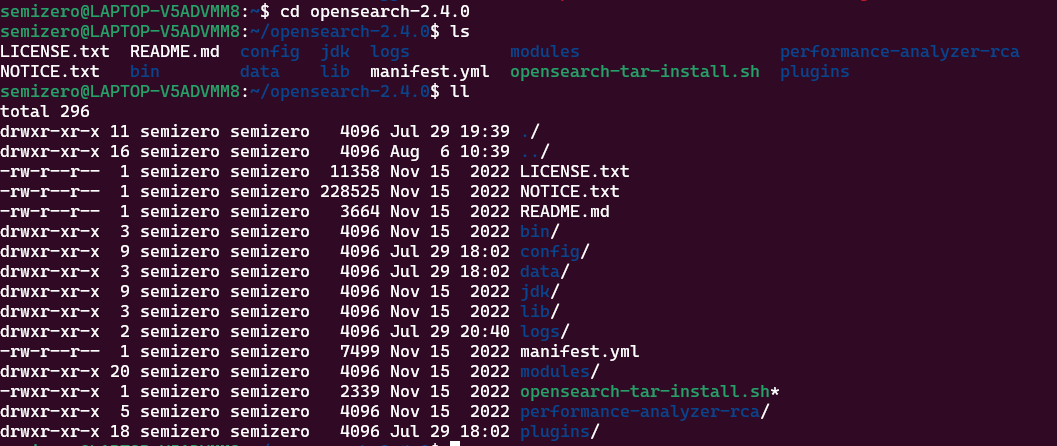
<Opensearch 주요 디렉토리>
- bin : 실행파일들의 위치
- config : 설정 파일의 위치. 부팅하기 전에 설정을 완료
- data : opensearch 가 데이터를 저장하는 위치
- jdk : 내장 JDK. Host 에 JDK가 설치되어있지 않으면 사용
- logs : log 디렉토리
- plugins : plugin 의 위치
2. Opensearch 설정 변경
- Open opensearch.yml
vi $OPENSEARCH_HOME/config/opensearch.yml- 다음 줄 추가 후 저장
# Bind OpenSearch to the correct network interface. Use 0.0.0.0
# to include all available interfaces or specify an IP address
# assigned to a specific interface.
network.host: 0.0.0.0
# Unless you have already configured a cluster, you should set
# discovery.type to single-node, or the bootstrap checks will
# fail when you try to start the service.
discovery.type: single-node
# If you previously disabled the security plugin in opensearch.yml,
# be sure to re-enable it. Otherwise you can skip this setting.
# plugins.security.disabled: true
- jvm heap size 조정 후 저장
vi $OPENSEARCH_HOME/config/jvm.options-Xms128m
-Xmx128m
- java 경로 저장
export OPENSEARCH_JAVA_HOME=$OPENSEARCH_HOME/jdk- 원활한 실습을 위해 security 관련 플러그인 제거
bin/opensearch-plugin remove opensearch-security
bin/opensearch-plugin remove opensearch-security-analytics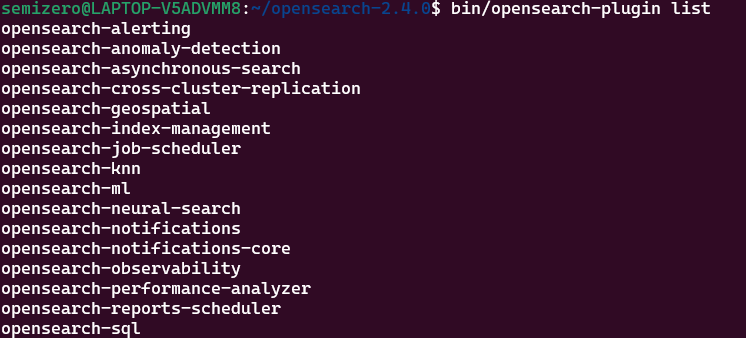
- 실행!!
./bin/opensearch
추후 실습에서 opensearch를 실행하고 있지 않아 발생하는 에러가 상당히 많기에 항상 opensearch가 실행되고 있는지 확인해야 한다.
https://semizero.tistory.com/41
[ELK] 오픈소스(Fluentd, OpenSearch)로 ELK 스택 설치 후 실습해보기 (2)
[순서] 1) ELK 아키텍처 개괄 2) Fluentd 설치 3) Log Generator로 로그 생성 4) Opensearch 설치 5) Fluentd로 로그파일 읽어서 보내기
semizero.tistory.com
'컴퓨터 활용(한글, 오피스 등) > 기타' 카테고리의 다른 글
| opensearch 설치 시 권한 및 보안 문제 (0) | 2026.03.19 |
|---|---|
| [ELK-3] 오픈소스(Fluentd, OpenSearch)로 ELK 스택 설치 후 실습해보기 (2) (0) | 2026.03.19 |
| [ELK-1] 로그모니터링을 위한 ELK Stack 개념들!! (0) | 2026.03.19 |
| Kafka, Logstash, Opensearch 설치 및 명령어 (0) | 2026.03.19 |
| vi편집기에서 "shift+6"이 줄 맨앞을 의미하는데 왜 6번일까? (0) | 2026.03.19 |